5 Common Product Photography Mistakes to Avoid
These common errors could be costing you sales. Learn what they are and how to fix them.
The Hidden Cost of Bad Product Photos
You could have the best product in your category at the best price with the best reviews. None of it matters if your photos make customers click away.
Bad product photography doesn't just fail to help sales. It actively hurts them. Customers make split-second judgments based on images. A photo that looks unprofessional makes your entire business look unprofessional.
Here are the five mistakes we see most often—and how to fix them.
Mistake #1: Poor Lighting
What it looks like: Dark, muddy images. Harsh shadows cutting across the product. Yellow or blue color casts that make products look different than they actually are.
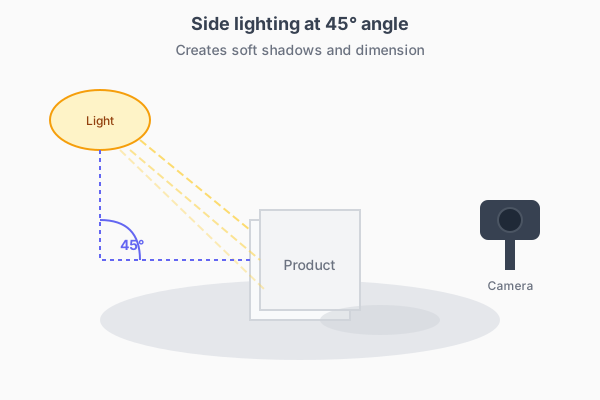
Why it happens: Most people shoot under whatever lighting is available: overhead kitchen lights, desk lamps, mixed window light.
The real cost: Customers can't see product details clearly. Colors look wrong, leading to returns when items arrive and don't match expectations.
The fix: Natural light from a window is free and effective. Position your product near a window (not in direct sunlight) with the light hitting it from the side. If you're shooting at night or in a dark room, a basic softbox or ring light costs under $50 and makes a big difference.
Mistake #2: Distracting or Inappropriate Backgrounds
What it looks like: Products photographed on kitchen counters, unmade beds, or cluttered desks. Backgrounds that clash with or overpower the product. That weird grey-ish background that was supposed to be white.
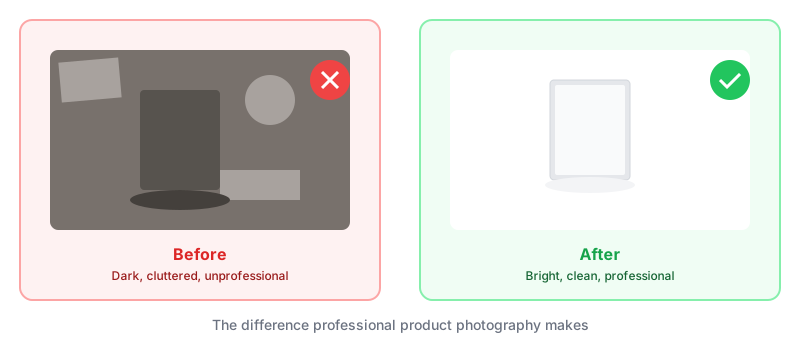
Why it happens: Setting up a proper background feels like too much work. People assume they'll just crop or edit later.
The real cost: Distracting backgrounds split attention. Cluttered settings look unprofessional. Inconsistent backgrounds across listings make your store feel disorganized.
The fix: For white backgrounds, you need actual white—a poster board or seamless paper backdrop. The surface should curve up behind the product (no visible horizon line). Light the background separately from the product to prevent grey shadows.
For lifestyle shots, plan the setting intentionally. Every element should be there for a reason.
Mistake #3: Blurry or Low-Resolution Images
What it looks like: Soft, unfocused products. Pixelation when customers zoom in. Images that looked fine on your phone screen but fall apart on desktop.
Why it happens: Camera shake during the shot. Autofocus locking on the wrong point. Uploading compressed images.
The real cost: Blurry photos signal "amateur" to customers. They can't inspect product details. Zoom functionality becomes useless.
The fix:
- Use a tripod or stabilize your camera/phone
- Tap to focus directly on the product, not the background
- Shoot at your camera's highest quality setting
- Enable a two-second timer to eliminate shutter-press shake
- Check images at 100% zoom before moving on
Mistake #4: Inconsistent Photos Across Your Catalog
What it looks like: One product on white, another on grey. Different lighting temperatures across listings. Some images cropped tightly, others with excessive empty space.
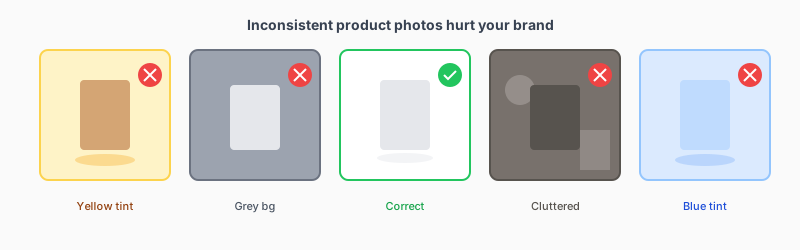
Why it happens: Products get photographed weeks or months apart. Different people take different photos. Equipment and setups change over time.
The real cost: Inconsistency makes your business look disorganized and small. Customers browsing your store experience visual whiplash. Brand recognition suffers.
The fix: Create a style guide for your product photography:
- Background type and color
- Lighting setup
- Camera distance and angle
- Crop dimensions
- Editing adjustments
Then stick to it.
Mistake #5: Missing Critical Angles and Details
What it looks like: One photo per product. Important features not shown. Scale completely unclear.
Why it happens: Photographers get the "main shot" and move on. Nobody thinks through what questions customers might have.
The real cost: Every missing angle is a potential lost sale. Customers who can't see what they need either leave or buy from competitors who show more.
The fix: Before shooting, list every feature customers might want to see:
- All sides (front, back, left, right)
- Top and bottom if relevant
- Close-ups of textures, labels, buttons
- Scale reference (hand, ruler, common object)
- What's included in the package
For each feature, capture a dedicated image.
The Common Thread
Notice what connects all five mistakes: they happen because good product photography traditionally required significant time, skill, and equipment.
AI-powered product photography removes these barriers. Professional-quality results no longer require professional setups. Consistency happens automatically. Multiple styles and angles generate from single source images.
Try it free and stop letting photography mistakes cost you sales.
Ready to transform your product photos?
Upload a photo and see what AI can do. No credit card required.
Try it freeMore articles
Discover how artificial intelligence is changing the game for online sellers, making professional product photos accessible to everyone.
From studio white backgrounds to lifestyle shots, learn which photo styles work best for different products and platforms.