Behind the Scenes: How Our AI Creates Product Photos
A look at the technology that powers AI product photography and how we achieve photorealistic results.
More Than Just Background Removal
When you upload a product photo to our tool, you're not just getting a simple background swap. Behind every generated image is a complex pipeline that analyzes, understands, and reconstructs your product in entirely new contexts.
Here's what actually happens between "upload" and "download."
Step 1: Product Understanding
Before anything else, the system needs to understand what it's looking at.
Object Detection
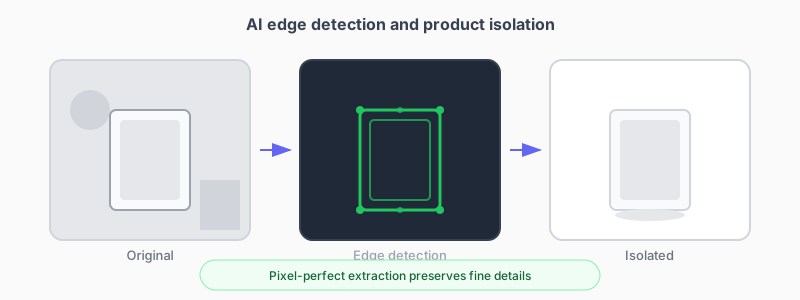
The AI identifies your product in the image, separating it from the background, shadows, and any props. This happens at the pixel level—the system knows exactly where your product ends and everything else begins.
Material Analysis
Different materials interact with light differently. Metal reflects. Fabric absorbs. Glass refracts. The AI categorizes the surfaces it sees: is this matte or glossy? Textured or smooth? Transparent, translucent, or opaque?
This matters because a shoe placed in a sunny outdoor scene needs different lighting on its leather than on its rubber sole.
Shape Understanding
Beyond 2D pixels, the system builds a model of your product's 3D form. It estimates which surfaces face toward light, which face away, where edges curve, and how the object would cast shadows at different angles.
Step 2: Intelligent Extraction
Traditional background removal tools use simple edge detection. They work fine for objects with clear boundaries but struggle with:
- Fine hair or fur
- Transparent or semi-transparent products
- Objects that cast soft shadows
- Products with thin elements (jewelry chains, wire handles)
Our extraction process handles these edge cases by understanding context, not just pixel color differences. It knows that the slight blur around a fuzzy sweater is part of the product, not the background.
Step 3: Scene Generation
Depending on your selected style, the AI creates an entirely new environment around your product.
For White Backgrounds
It sounds simple—just pure white. But a truly professional white background requires:
- Soft, even lighting that wraps around the product
- Gentle shadows that ground the object (it shouldn't float)
- Color-accurate product representation
- Exposure balanced so white is white without blowing out highlights
For Lifestyle Scenes
The AI generates environments that make sense for your product type:
- Surface textures (wood, marble, concrete, fabric)
- Background elements (blurred interiors, outdoor scenes)
- Atmospheric lighting (soft morning light, golden hour, studio lighting)
- Supporting props when appropriate
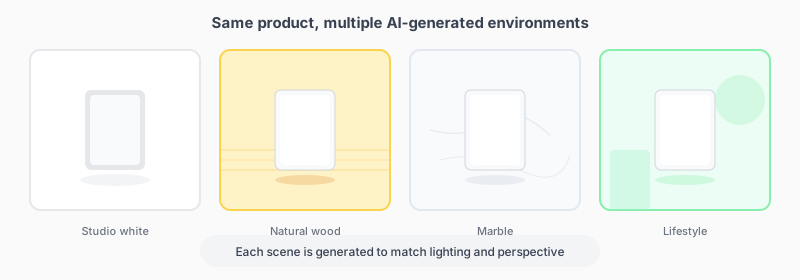
These scenes aren't pulled from a library of stock photos. They're generated specifically for your product, with lighting and perspective that match.
Step 4: Realistic Composition
Placing a product into a scene convincingly requires more than just positioning.
Lighting Consistency
If the generated scene has light coming from the left, your product needs to be lit from the left too. The AI adjusts highlights and shadows on your product to match the environment's light sources.
Shadow Generation
New shadows are calculated based on the scene's lighting: where the product sits, how far it is from surfaces, whether light is soft or hard.
Color Harmony
The product's colors are adjusted slightly to sit naturally in the scene. This doesn't change the product's actual colors—it applies the same subtle color influence that real environments have on real objects.
Step 5: Quality Enhancement
The final pass adds polish:
Sharpness Optimization
Different parts of the image get different sharpness treatment. Product edges are crisp. Backgrounds may be slightly softer (natural depth of field).
Color Accuracy
Your product's colors are verified against the original upload. If the generation process shifted colors, they're corrected.
Detail Recovery
If your source image had slightly soft areas, enhancement algorithms can recover some of that detail.
Honest Limitations
We believe in transparency about what AI can and can't do:
Best results when:
- Source images are well-lit and in focus
- Products are clearly visible and not obscured
- Original image captures true product colors
- Product is photographed at a usable angle
More challenging:
- Very dark or very overexposed source images
- Heavily motion-blurred products
- Products shot at extreme angles
- Items with complex transparency (clear bottles with liquid)
Try It Yourself
The best way to understand what AI product photography can do is to see it in action with your own products.
Upload your first product photo and watch the technology work. You'll have professional images in minutes.
Ready to transform your product photos?
Upload a photo and see what AI can do. No credit card required.
Try it freeMore articles
Discover how artificial intelligence is changing the game for online sellers, making professional product photos accessible to everyone.
From studio white backgrounds to lifestyle shots, learn which photo styles work best for different products and platforms.
These common errors could be costing you sales. Learn what they are and how to fix them.