10 Product Photography Tips That Will Boost Your Sales
Learn the secrets professional photographers use to create images that convert browsers into buyers. From lighting to composition, we cover everything you need to know.
Why Good Product Photos Matter
Research consistently shows that product images rank among the most influential factors in online purchase decisions. When a customer can't physically examine what they're buying, the photo carries most of the weight.
A blurry photo taken on your kitchen counter tells customers "this seller doesn't care." A crisp, well-lit image says "this is a legitimate business with a quality product."
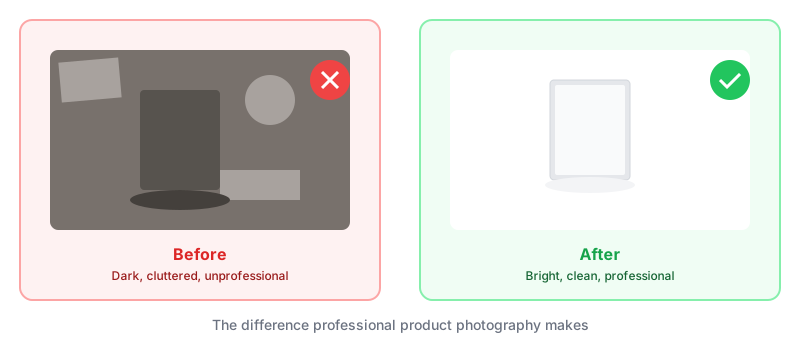
The difference between these two outcomes often comes down to a handful of techniques that anyone can learn.
1. Light From the Side, Not From Above
The biggest mistake new sellers make is shooting under overhead lighting. Kitchen lights, ceiling fixtures, direct sunlight from above—they all create harsh shadows that make products look cheap.
Instead, position your main light source to the side of your product, at roughly a 45-degree angle. This creates gentle shadows that give your product dimension and depth.
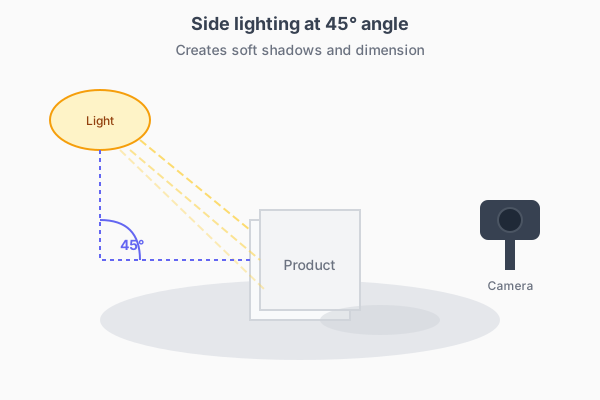
The quick fix: Set up near a window. Natural light from the side is free and flattering for almost any product. Shoot in the morning or late afternoon when the light is softer.
2. Use a White Background (But Know When to Break This Rule)
White backgrounds remain the gold standard for e-commerce. Amazon requires them. eBay recommends them. They work because they:
- Put all focus on the product
- Look professional and clean
- Make color-matching easier for customers
But pure white isn't always the answer. Lifestyle shots showing your product in use often outperform white-background-only listings when it comes to conversions. The key is having both: clean product shots for the main image, lifestyle photos to tell the story.

3. Get the Angles Right
One product photo isn't enough. Customers want to see:
- Front view — The hero shot
- Back view — What does the other side look like?
- Side profile — Shows depth and build quality
- Detail shots — Textures, buttons, stitching, labels
- Scale reference — How big is this thing, actually?
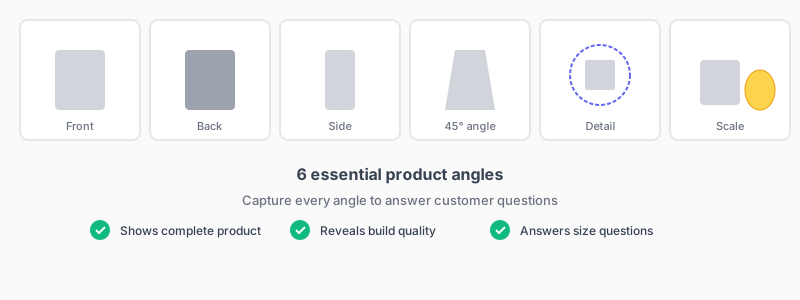
Six to eight photos per product is the sweet spot for most categories. More than that and you're padding. Fewer and you're leaving questions unanswered.
4. Stabilize Your Camera
Blurry photos happen when the camera moves during the shot. Even slight hand tremor shows up as softness in the final image.
You don't need an expensive tripod. A stack of books works fine. Lean your phone against something stable. The goal is zero movement while the camera captures the image.
If you're using a phone, turn on the self-timer. That two-second delay lets any vibration from pressing the button settle before the photo is taken.
5. Mind the Reflections
Reflective products—jewelry, watches, sunglasses, electronics—are notoriously difficult to photograph. Every light source in the room shows up as a bright spot on the surface.
The fix is diffused lighting. Professional photographers use softboxes, but you can improvise with:
- A white bedsheet hung between the light and product
- A cheap white shower curtain
- Shooting on an overcast day
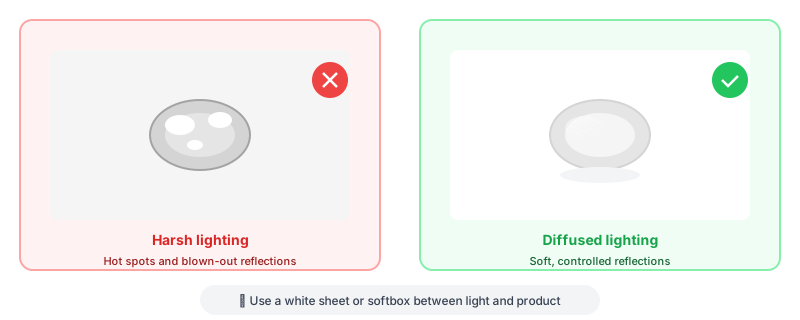
The goal is to turn hard, point-source light into soft, even illumination that wraps around your product without creating hot spots.
6. Clean and Prep Every Product
This sounds obvious, but it's skipped constantly. Fingerprints on glass. Dust on matte surfaces. Wrinkles in fabric. Scratches you stopped noticing.
Before every shoot:
- Wipe down with appropriate cleaner
- Use compressed air for electronics and intricate items
- Steam or iron fabrics
- Remove stickers and tags (unless they add value)
Zoom in on your test shots at 100%. You'll catch problems the naked eye misses.
7. Create Depth With Layering
Flat, head-on shots make products look like clip art. Creating depth makes them feel real and tangible.
Try this: Instead of placing your product flat against the background, angle it slightly. Prop up the back edge. Let it face the camera at a 10-15 degree angle. Suddenly it has dimension.
For multiple-item shots, overlap products slightly. Place some closer to the camera, others further back. This creates visual hierarchy and makes the image more interesting.
8. Match Your Lighting Temperature
If you're mixing light sources—say, a window and a lamp—make sure they're the same color temperature. Daylight is blue-ish. Incandescent bulbs are orange. Mixing them creates weird color casts that look unnatural.
The simplest solution: use one light source. If you need more light, add reflectors (a white poster board bounces light beautifully) rather than additional lamps.
9. Shoot in RAW If You Can
JPEG compression throws away image data to save file size. RAW files keep everything, giving you more flexibility when editing.
Most smartphones now support RAW capture through their pro/manual modes. The files are bigger, but you can recover shadows, fix white balance, and adjust exposure without the image falling apart.
If RAW feels like overkill, at least shoot at your camera's highest quality JPEG setting.
10. Edit Consistently Across Your Catalog
Nothing looks more amateur than a product listing where every photo has different lighting, different backgrounds, or different color treatment.
Pick an editing style and stick with it:
- Same white balance
- Same contrast and brightness levels
- Same crop ratios
- Same shadow treatment
This consistency builds brand recognition and makes your listings look professional, even if each product was shot weeks apart.
The Shortcut: AI-Generated Product Photos
Learning these techniques takes time. Setting up proper lighting takes space. Maintaining consistency across hundreds of products takes serious effort.
That's exactly why we built this tool. Upload a basic photo of your product—even a smartphone snapshot—and the AI generates professional-quality images in multiple styles.
No studio. No equipment. No technical knowledge required.
Try it free and see the difference professional images make.
Ready to transform your product photos?
Upload a photo and see what AI can do. No credit card required.
Try it freeMore articles
Discover how artificial intelligence is changing the game for online sellers, making professional product photos accessible to everyone.
From studio white backgrounds to lifestyle shots, learn which photo styles work best for different products and platforms.
These common errors could be costing you sales. Learn what they are and how to fix them.